
Early access is available. Download Adamas Hub now!
XR Development
Made SimpleMade Simple
Adamas provides core XR infrastructure and multiplayer systems for developers to create experiences without starting from scratch.
Robotics SolutionsExplore Robotics Solutions
Deploy robots today. Operate at scale.
Robotics services from first integration through ongoing field operations.Integration & deployment
Teleoperation
Human intervention
Fleet operations
Operations / overview
Robotics Solutions
Ready
Built-in XR Infrastructure
Build XR apps without rewriting the boilerplate
Developers can focus on app logic and experience design while Adamas handles shared runtime features like multiplayer sessions, avatars, locomotion, networking, and object interaction.Traditional XR apps bundle avatars, locomotion, interaction, and multiplayer into every build.
Adamas turns that repeated stack into one runtime that can keep serving new applications.
The runtime process is shared with multiple XR apps, each focused only on the application logic.
Multiplayer by Default
Launch once. Use together across every headset
Adamas makes multiplayer XR part of the runtime, so when one user launches an app in a network session, it becomes available for all connected clients to use together.A user launches an application inside a shared network session.
Adamas automatically opens the same application for the other connected clients.
Everyone can use the app together with application state being fully synchronized.
Modular App Runtime
Create Modular XR Projects That Can Run Together
With Adamas SDK, each application can be loaded into a shared XR environment, allowing separate apps to coexist instead of being locked into standalone experiences.Many Projects, One Shared WorldRather than packaging every experience as a separate standalone application or isolated world, Adamas lets multiple projects run together in the same shared XR space.
Samples
Try Real XR Projects and Start Building Your Own
Explore samples in Adamas Hub
View sample projects and build from the source
Project Studio
Design Visually while Keep Your TypeScript Workflow
A visual editor for standard Node.js and TypeScript projects, enabling developers to set up scenes, manage assets, and package builds without giving up the normal TypeScript workflow.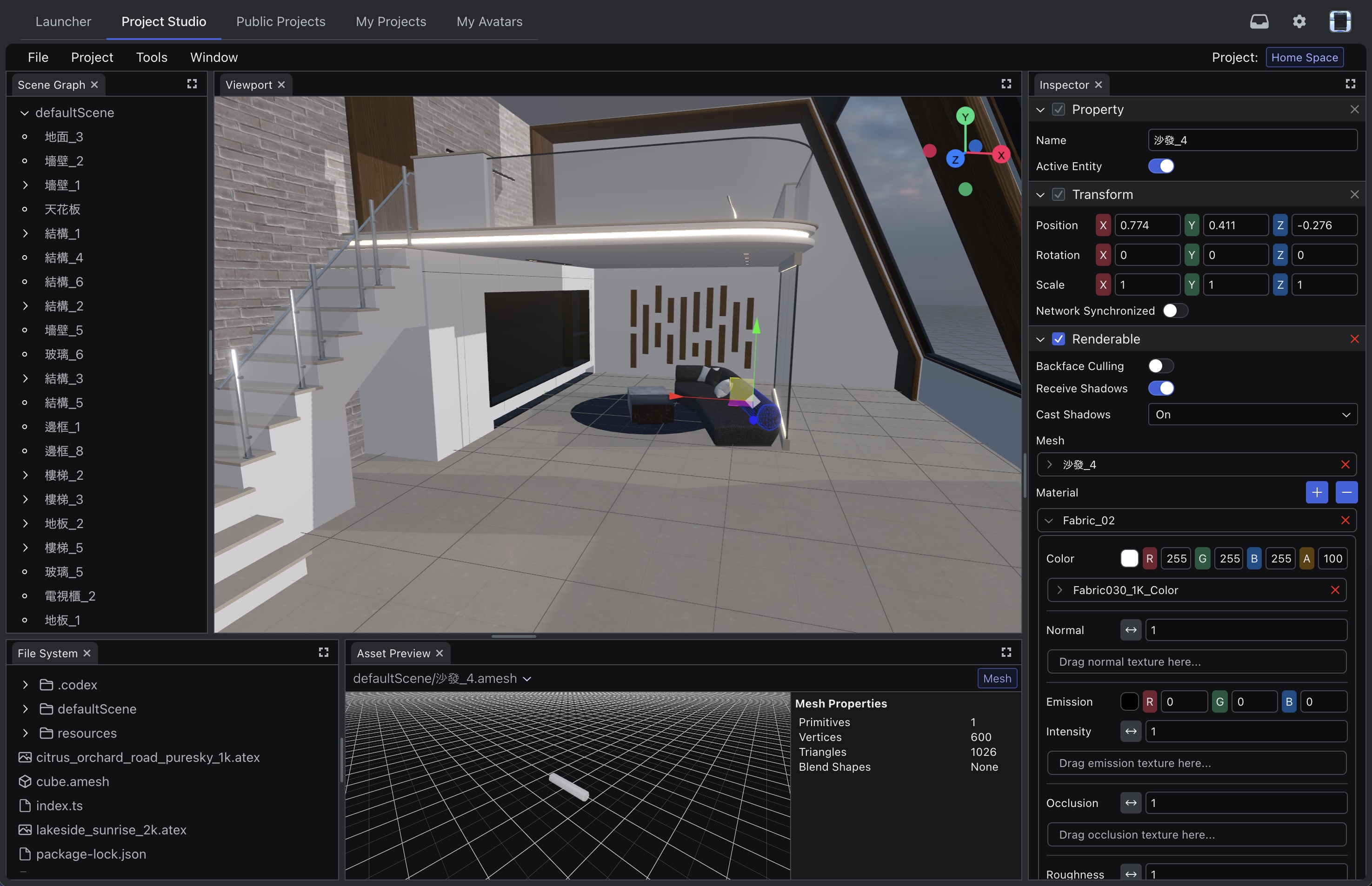
Build visually on top of your existing TypeScript project structure.
TypeScript Workflow
Build Projects With the Tools Your Team Already Know
Teams can build XR projects with familiar web development workflows, helping developers move faster without learning a completely new XR stack.Toolchain
Build Projects in TypeScript and Node.js
Write gameplay logic, services, and project code in standard TypeScript and run it on a normal Node.js stack from day one.

Integration
Connect With Your Existing Tools
Install the Adamas SDK through npm and use it alongside the libraries, services, and SDKs your team already depends on.Quick Start
Start Building in Minutes
Install the SDK, open the docs, and launch a sample project as your starting point.Install SDK
npm install @adamasvr/sdkLaunch in XR
import { Project } from "@adamasvr/sdk";
import { projectBundle } from "adamasvr:editor";

Project.FromBundle(projectBundle).Launch(
	async (sceneGraph, project) => {},
);
Community
Product news, practical resources, and occasional demos. No noise.